Channel manager
Every channel.One calendar.
The BnBFlow channel manager connects Airbnb, Booking.com, Vrbo, Expedia and many other channels to a single calendar. Bookings come in automatically, availability is blocked everywhere within seconds, and prices and restrictions go out from the calendar to every channel.


- Airbnb
- Booking.com
- Direct
- Completed
- Pending
- Missing
- Bookings and availability, automatic
- Prices and restrictions per channel
- Certified channel manager
In 18 seconds
01Sync
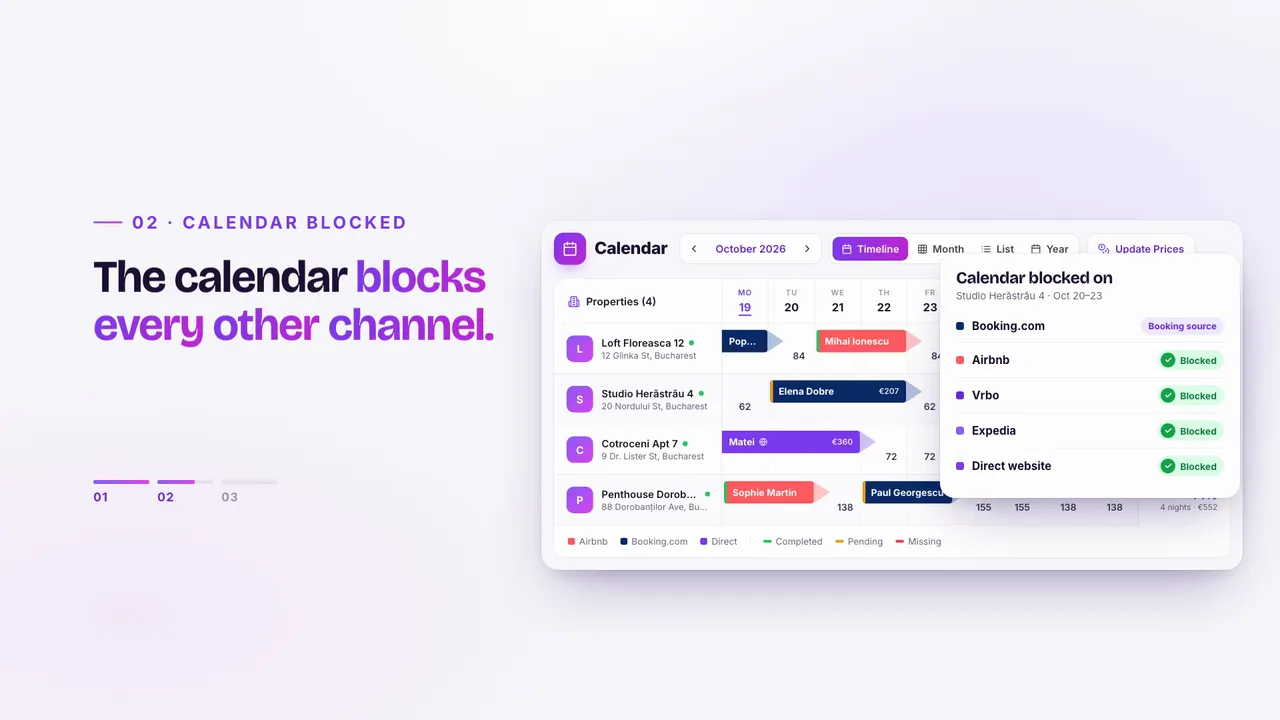
A new booking. The calendar blocked everywhere.
When a booking arrives on one channel, BnBFlow closes the same nights on the others. Changes and cancellations flow back the same way, with nothing copied by hand.
- One calendar for the whole portfolioChannel bookings, direct ones and those added by hand, in the same view.
- Messages next to the bookingChannel conversations land in the unified inbox, linked to the stay.
- Airbnb
- Booking.com
- Vrbo
- Expedia
- + many others
- Airbnb
- Booking.com
- Vrbo
- Expedia
- Direct site
02Prices and rate plans
One price in the calendar. Rules for every channel.
You set the price once, in the calendar. On each channel you can add a markup, and rate plans, from non-refundable, weekly or monthly to any plan you create, get their prices from BnBFlow, with their own minimum stay.
- Minimum stay, closed arrivals and departures, per day
- Markup per channel, applied once
- Bulk changes across several properties
- Dynamic pricing if you want it, with SmartPrice or PriceLabs
- StandardMin. 2 nights€96
- Non-refundableMin. 2 nights€86
- WeeklyMin. 7 nights€82
- With breakfastMin. 2 nights€106
03All channels
Every channel, on its own page.
What syncs differs from one channel to another. Each channel’s page shows what comes in, what goes out and how it connects.
- AirbnbBookings, prices, availability, messages and reviews; listings are imported directly.From the app
- Booking.comBookings, prices, restrictions, messages and reviews; one connection per building.From the app
- VrboBookings in the BnBFlow calendar; availability and prices go out from BnBFlow.With the BnBFlow team
- ExpediaBookings in the BnBFlow calendar; availability and prices go out from BnBFlow.With the BnBFlow team
- Direct booking websiteBookings from your own website, in the same calendar as your channels.Direct
- Another channelSelling on a channel that isn’t listed here? Tell us which one and we check the connection together.On request
04Adding a channel
A new channel, without changing anything else.
- 01
Airbnb and Booking.com, from the app
Airbnb: authorize your Airbnb account and pick your listings. Booking.com: your property ID and the connection activated in the extranet, step by step.
- 02
Vrbo and Expedia, together with us
Tell us which listings you have; we check them and connect them to the BnBFlow calendar together.
- 03
Any other channel, on request
Tell us where you sell and we tell you what is possible, the same business day or the next one at the latest.
05FAQ
About the channel manager.
Didn’t find your answer? Message us — we reply the same business day, the next one at the latest.
Message us on WhatsAppWhich channel manager syncs Airbnb and Booking.com in Romania?
BnBFlow includes a certified channel manager that syncs bookings, availability, prices and restrictions with Airbnb and Booking.com automatically, plus Vrbo, Expedia and many other channels. It is built in Romania, with check-in, invoicing and e-Factura in the same platform.
Which channels can I connect to BnBFlow?
Airbnb and Booking.com, directly from the app; Vrbo and Expedia, together with the BnBFlow team; and your direct booking website. For other channels, tell us where you sell and we check the connection together.
Can I connect the channels myself?
Airbnb and Booking.com, yes: from the app, in a few steps. We connect Vrbo and Expedia together with you.
How is it different from iCal sync?
iCal only copies booked days, with a delay, and sends no prices or restrictions. The channel manager works with the channels directly: bookings come in immediately, and prices, minimum stay and rate plans go out from BnBFlow to every channel.
Can I have different prices on Airbnb and Booking.com?
Yes. The base price lives in the calendar, and you can add a markup on each channel. Channel rate plans get their prices from BnBFlow too.
Which plan includes the channel manager?
Professional and Standard. Essential includes online check-in and the calendar, without channel connections.
Channel manager
All your channels, in one calendar.
Tell us which channels you sell on. You can start on your own or with our team’s help; we agree together on how onboarding works, depending on your plan and number of properties.