Guest extras
Guest extras,paid before arrival.
With BnBFlow, guests order early check-in, late check-out, parking or your own services online, before arrival or during the stay, and pay by card, and the money goes to your bank account. The app checks it can be done, you accept, and the arrival time, the cleaning and the smart lock code move by themselves.
Message us on WhatsApp- Early, late, parking and your services
- Paid online, into your bank account
- Your team sees what to prepare
01What the guest sees
Ordered at check-in. Tracked on the stay page.
Extras appear right in the check-in form, next to the stay details, with the time and the total price. After ordering, the guest finds them on the stay page, with the status of each one and what else they can add.
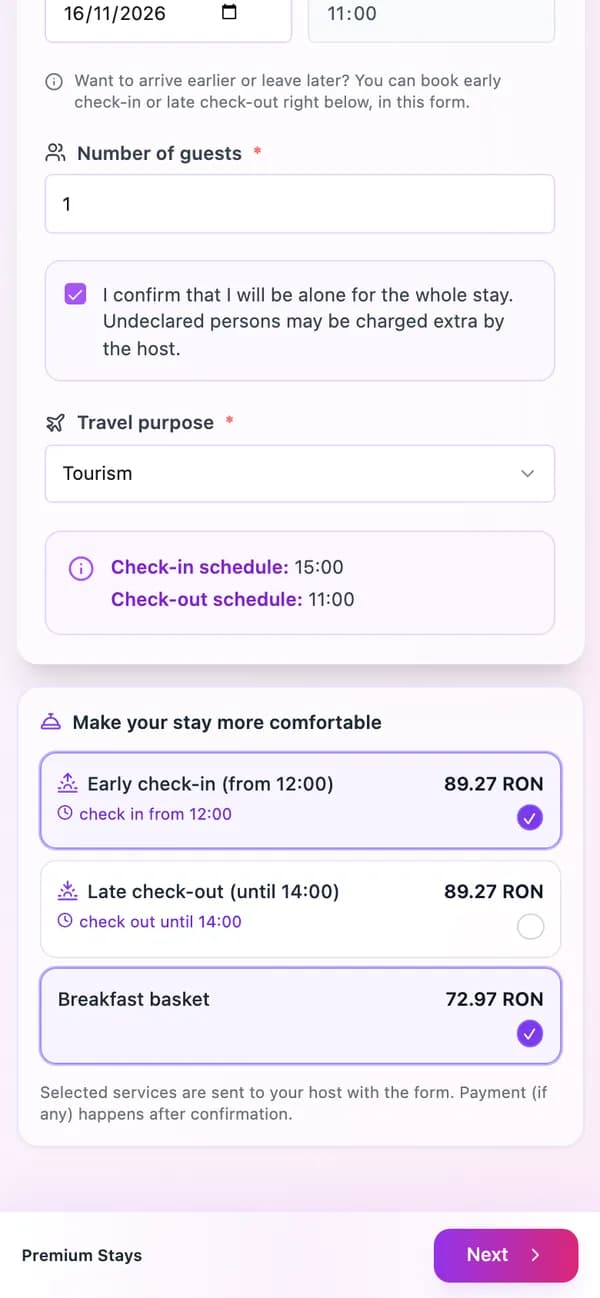
In the check-in formEarly check-in with the time the guest can arrive, late check-out and a breakfast basket, each with its total price. 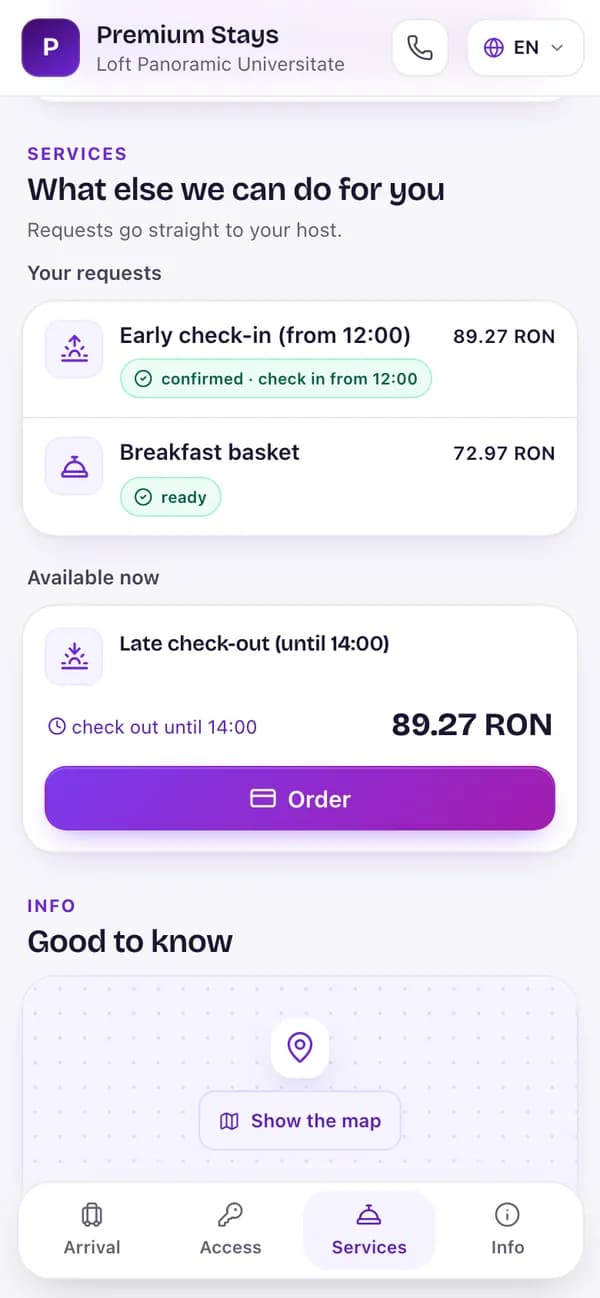
On the stay pageConfirmed orders, with the arrival time, and the extras still available, one tap away.
02Your services
Set them up once, for the properties you choose.
You choose what you offer and how it’s charged: per item, per stay or per night, with or without a quantity. For early check-in and late check-out you set the price by the hour, and the times offered take into account the neighbouring departure and arrival and the turnover time between guests.
- Early check-in, late check-out, parking and your own services, in Romanian and English
- Paid online by card, or on site
- The company that collects and invoices, chosen per service
- Parking only on properties where parking is paid
- 10:00€40
- 12:00€24
- 13:00€16
- Payment
- Online, by card
- Invoiced by
- Aurelia Stays SRL
- Approval
- You confirm it
- Shown on
- Check-in form · Stay page
03The order
The app checks. You just accept.
When a guest orders, you see whether the night before is open, whether the property is ready and whether it clashes with another arrival. Once you accept, the stay times, the cleaning task and the smart lock code move by themselves.
- Automatic acceptance, for services that don’t need checking
- The night before closes for sale after an accepted early check-in
- A note on your team’s task: “⏰ Early check-in 13:00”
- The night before is open
- The apartment is clean in time
- No clash with another arrival
Once accepted, these move by themselves: the arrival time, the cleaning task and the lock code.
04Money and invoice
The money, in your account. The invoice, on the right company.
Payment goes to your bank account, linked to the booking, and an invoice can go out for every payment, from the company chosen for the service. In BnBFlow you see service income next to direct bookings and the tourist tax.
- A payment deadline, with a reminder and cancellation when it expires
- On-site payments marked as collected are invoiced too
- Parking instructions appear only after a confirmed order
- Direct booking · 3 nightsElena Dobre · Studio Herăstrău 4€207.00Collected
- Early check-in + parkingAna Popescu · Loft Floreasca 12€40.00Collected
- Tourist taxSophie Martin · Casa din Vii€8.28Collected
05FAQ
About guest extras.
Didn’t find your answer? Message us — we reply the same business day, the next one at the latest.
Message us on WhatsAppHow do I sell early check-in and late check-out?
Add your services, with the price by the hour, and pick the properties. Guests see them at check-in and on the stay page, choose a time and pay by card. The times offered take into account the neighbouring departure and arrival and the turnover time between guests.
Does the guest need to download an app?
No. They order from the stay page: a guest app in a link, nothing to download. They open it in their phone’s browser, pick the service and pay by card.
Where does the money from extras go?
Into your bank account; the payment is secured by Stripe. Every payment is linked to its booking and shows in BnBFlow, under the company that collected it; an invoice to the guest can go out for it.
Do I have to accept every order?
By default, yes: you see the order with the app’s checks and accept or decline it. For services that don’t need checking you can turn on automatic acceptance.
Can I sell parking per night?
Yes. Parking can be sold per night, per stay or per item, only on properties marked as having paid parking. Guests see the calculation before they pay, and the parking instructions appear after the order.
Which plan includes guest extras?
Guest extras and online payments are activated on request, on any plan, and priced separately.
Guest extras
More from every stay. No phone calls, no bank transfers.
Tell us what you manage and what you’d like to offer. We show you how extras work for your guests and agree together on how you start.